Install your shop helper
Four steps. It takes about ten minutes. Each step gets a green tick.
Your helper goes on your own Cloudflare account. You own it. We never see your chats.
1 Your license key ✓
Find it in your Payhip email, under License Key. Copy it and paste it here.
2 A Cloudflare token ✓
No Cloudflare account yet? Make one at dash.cloudflare.com. The free plan is fine.
A token lets us put your helper on your account. Make one like this:
- Press Open the token page. Log in to Cloudflare if it asks.
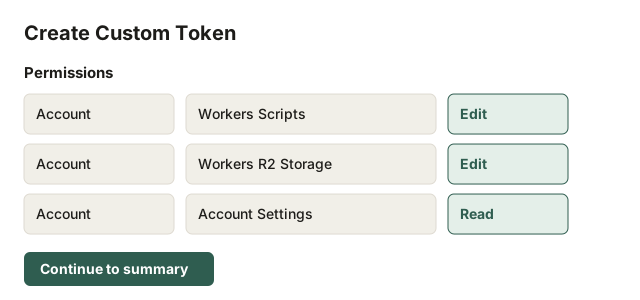
- The page fills in the three things it needs. Check they match this list. If one is missing, press Add more. Each row has three boxes. Pick Account, then the name, then Edit or Read.
- Workers Scripts Edit
- Workers R2 Storage Edit
- Account Settings Read
- Leave the rest as it is. Press Continue to summary, then Create Token.
- Press Copy next to your new token. Paste it below.
We use your token once, for this install only. We never save it. We never write it down in any log. When you are done, you may delete it in Cloudflare. Your helper keeps working.
3 A name and a setup key ✓
Small letters and numbers only. For example: myshophelper
This is the password for your setup page. Make it 24 letters or more. Or press Make one for me.
4 Install ✓
Press Install. It takes about one minute. Keep this page open.
Log in there with your setup key. Then follow the guide from step 3.
Your helper's address: